The DAOdesign team created this software based on years of experience.
If you encounter any problems during use or have other suggestions, please contact us via email or Twitter and we
will actively improve it.
A variety of modes are pre-made, and different parameters can be set in different modes, which is convenient and
quick.
IIDXOLLER Options provides powerful parameters that can be customized according to your preferences.
It can already adapt to most IIDX games under full default settings.
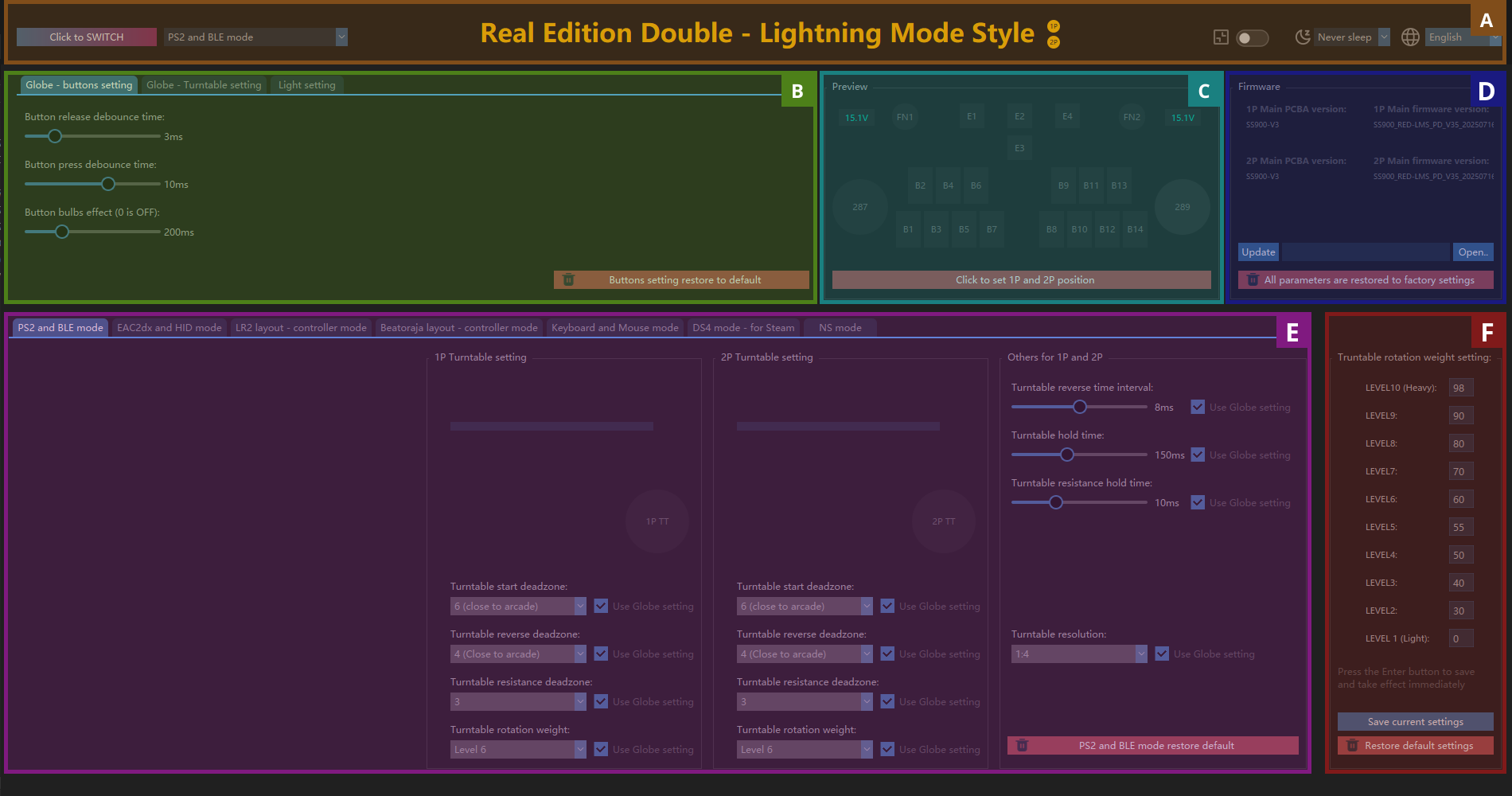
| A |
Mode switch, sleep mode, language |
|
B
|
Global function settings |
| C |
Preview Window |
| D |
Firmware preview, firmware burning |
| E |
Mode Settings |
| F |
Turntable weight (damping) setting |

| A1 |
Switch mode button, select the mode in A2 and click the button to take effect |
|
A2
|
Mode List |
|
A3
|
Displays whether 1P is connected. If not, it will be gray. |
| A4 |
Displays whether 2P is connected. If not, it will be gray. |
| A5 |
Ignore the Windows scaling function. If 125%, 150%, or 200% is set on Windows, you can force it to display at 100%. |
| A6 |
Sleep function: After 1-10 minutes, RED-LMS will turn off all lights. Press any button or turn the turntable to restore the lights. |
| A7 |
Select the language you are used to. The languagepack.xml file can be modified at will to add the language you are used to. |
| B1 |
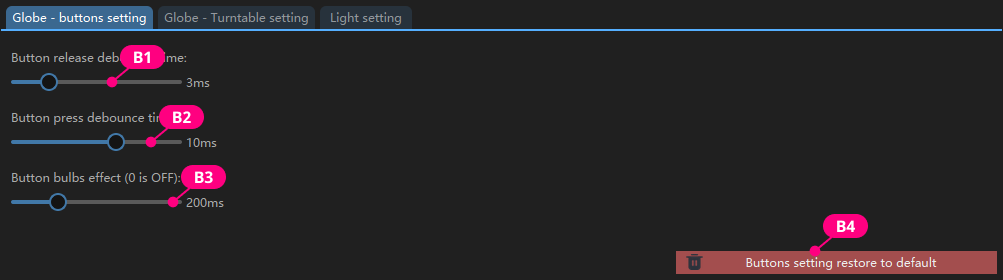
The time it takes to process jitter when releasing a microswitch. The default value of 3ms is
recommended. |
| B2 |
The time it takes to process jitter when a microswitch is pressed. The default value of 10ms is
recommended. |
| B3 |
The time it takes for the button light to turn off when the button is released. Usually it is recommended to be between 0-200ms; |
| B4 |
Restore the factory settings of the buttons. |
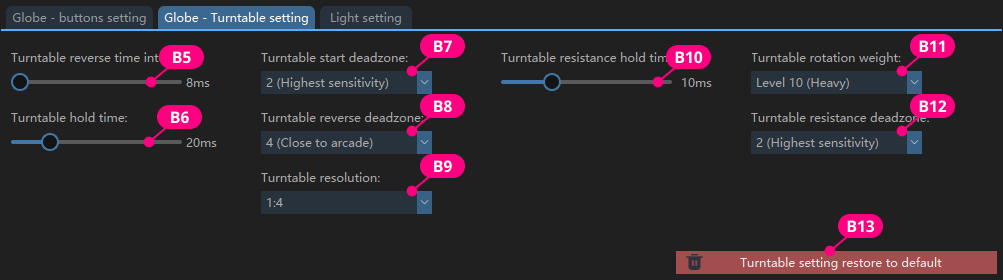
It looks a bit complicated, but in fact, it is usually necessary to adjust B7 and B8.
| B5 |
The time interval between turntable reversals. |
| B6 |
The recommended value is 20-100ms. The smaller the value, the faster the speed is required to |
| B7 |
It can be understood as sensitivity. The smaller the value, the higher the sensitivity. |
| B8 |
It can be understood as the sensitivity of the turntable reversal. The smaller the value, the
higher the sensitivity. |
| B9 |
When using 1:2, a slower turntable speed can trigger fast scrolling of the song selection menu; |
| B10 |
The time when the turntable damping is triggered; |
| B11 |
The current damping level of the turntable. |
| B12 |
It represents the angle at which the turntable must be rotated before a damping effect occurs. |
| B13 |
Restore the turntable settings to factory defaults. |
| B14 |
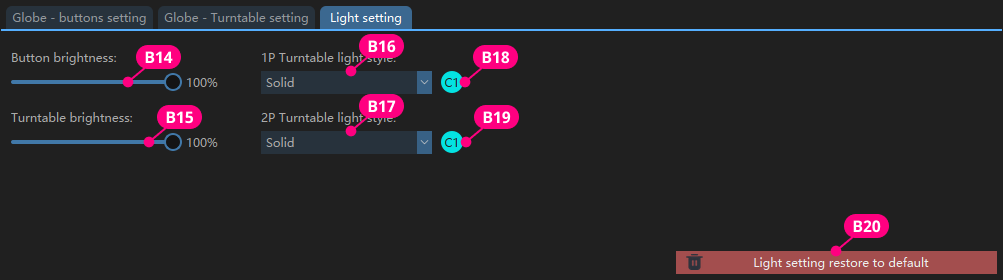
Set the button lighting brightness. |
| B15 |
Set the turntable light brightness. |
|
B16、B17
|
Select the turntable lighting effect. |
| B18、B19 |
Click C1 or C2 to set the corresponding turntable light color. |
|
B20
|
Restore lighting settings to factory defaults. |
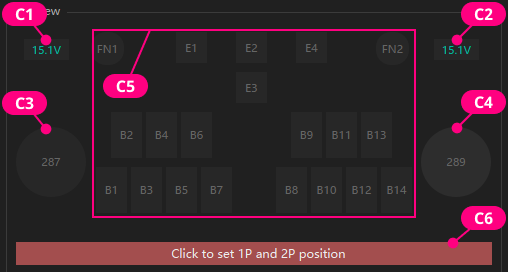
| C1、C2 |
Displays the voltage currently provided by the PD power supply. |
|
C3、C4
|
The original value of the turntable data does not participate in the actual output. |
| C5 |
Displays the currently pressed keys. |
| C6 |
Switch the physical locations of 1P and 2P. |
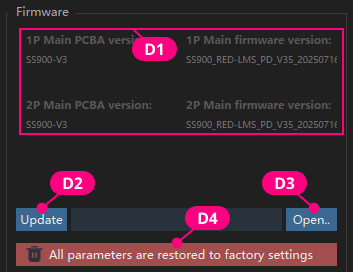
| D1 |
Display the current hardware version and firmware version |
| D2 |
Click to burn the firmware |
| D3 |
Click to open the window and select the firmware you want to burn. |
| D4 |
Restore all parameters to factory settings. |
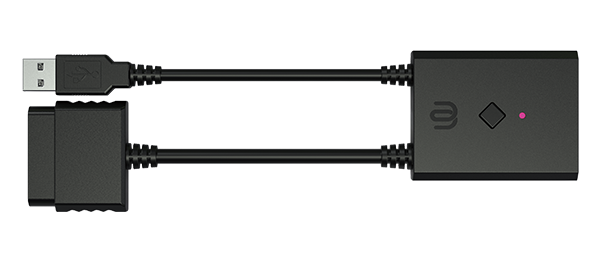
To use it on PlayStation2, you need to switch to this mode and use it with BE2PS;
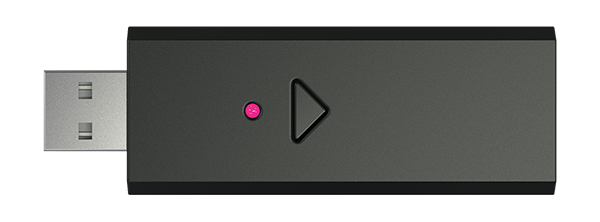
To use it with beatmania IIDX ULTIMATE MOBILE, you need to switch to this mode and use it with BE2BT.
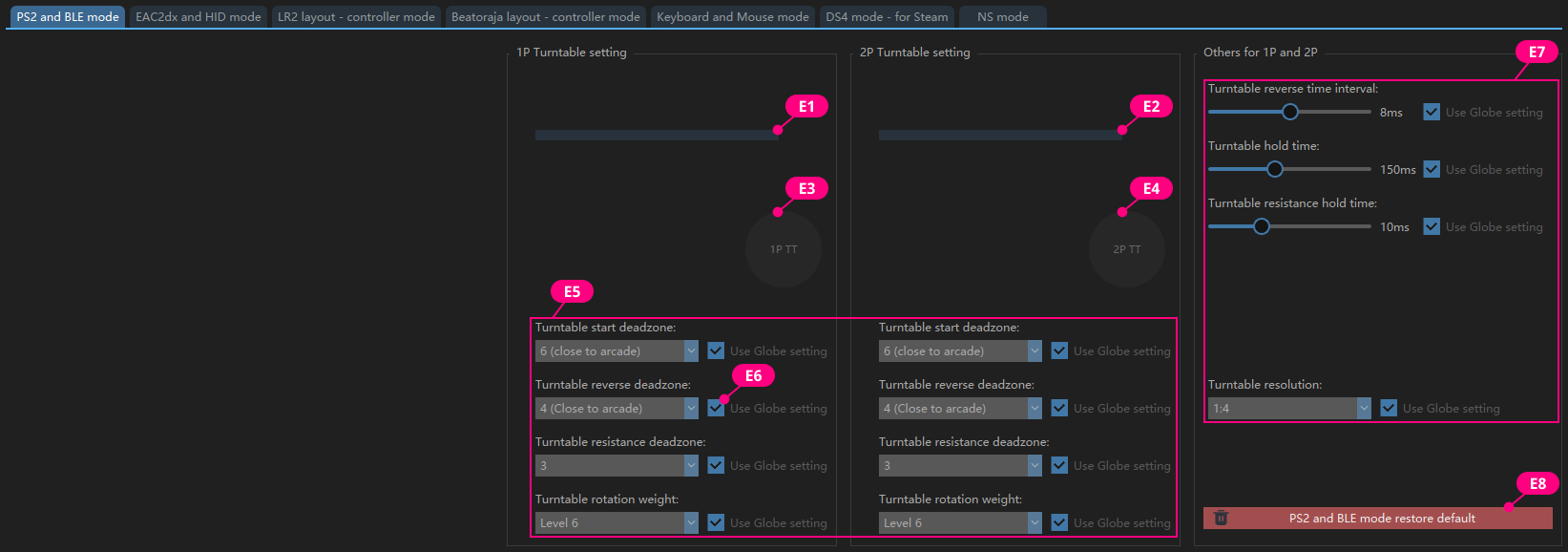
| E1、E2 |
Displays the absolute value of the current 1P and 2P turntable output X axis |
| E3、E4 |
1P and 2P turntables simulate in-game output |
| E5 |
Independently set the parameters of 1P and 2P in this mode. |
| E6 |
Check to use the global settings; |
| E7 |
Set common parameters for 1P and 2P |
| E8 |
Restore the current mode to default values |
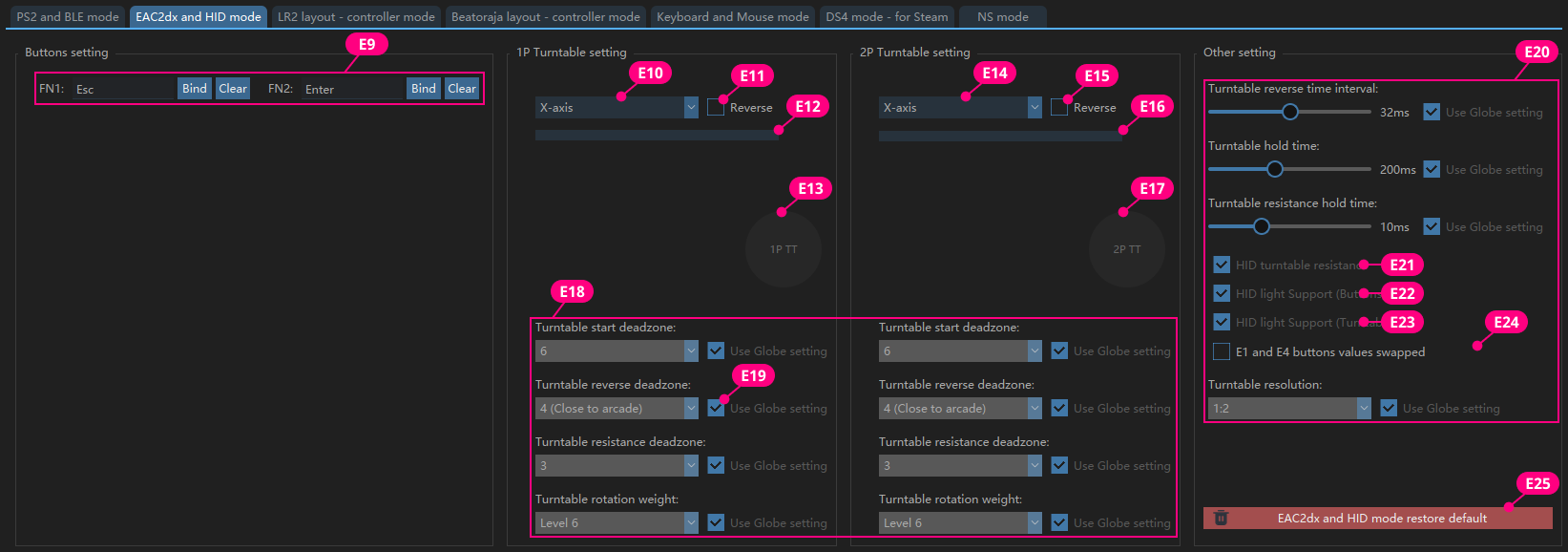
| E9 |
FN1, FN2 can be freely mapped to any keyboard value |
| E10、E14 |
Specify 1P turntable and 2P turntable output X-axis or Y-axis |
| E11、E15 |
X-axis, Y-axis forward or reverse |
| E12、E16 |
Display the current X-axis and Y-axis values in real time; |
| E13、E17 |
Simulate the state of Turntable output in the game |
| E18 |
Independently set the parameters of 1P and 2P in this mode |
| E19 |
Check to use the global settings; |
| E20 |
Set common parameters for 1P and 2P |
| E21 |
If checked, the damping data from spiceXXX will be automatically applied to the values of
LEVEL1-LEVLE10. |
| E22 |
If checked, the button will receive the spiceXXX downstream button light data. |
| E23 |
Check this to receive the downstream turntable light data from spiceXXX (only single color, if you want to use the ring light effect and color specified by IIDXOLLER Options, please do not check this) |
| E24 |
When performing Double Play on INFINITAS, select E1 or E4 as the Start button according to your preference. |
| E25 |
Restore the current mode to default values |
The turntable output is the key value, and is specially optimized for LR2 in this mode.
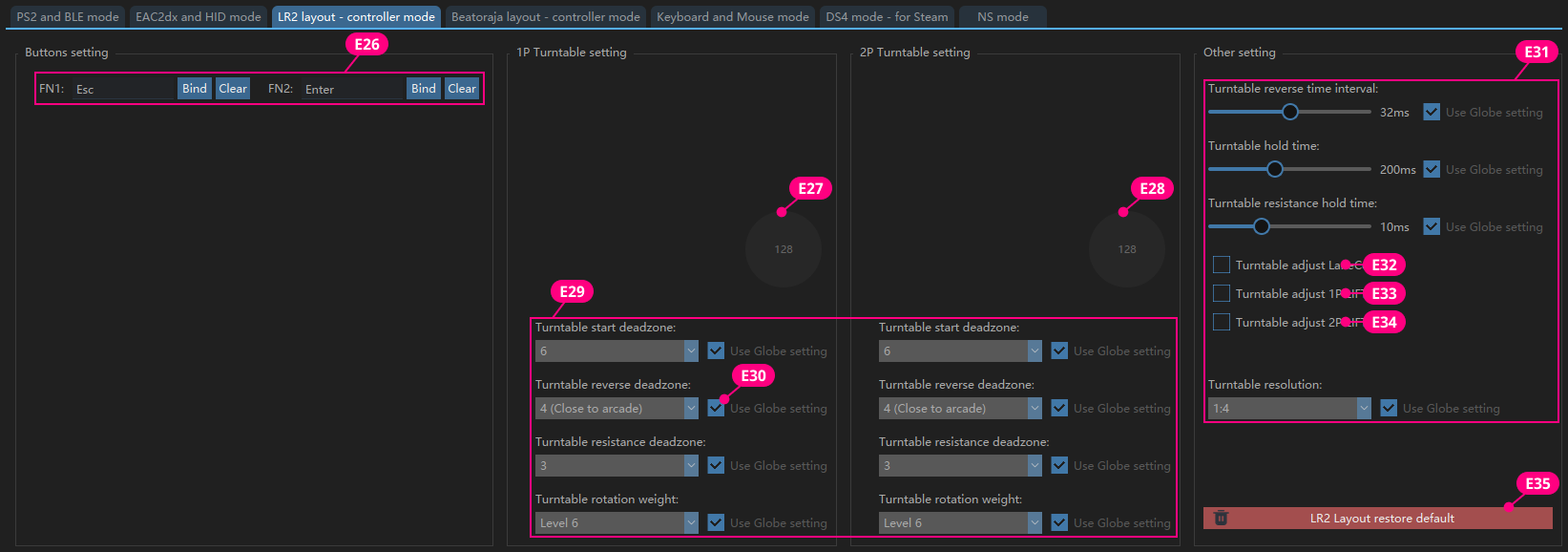
| E26 |
FN1, FN2 can be freely mapped to any keyboard value |
| E27、E28 |
Simulate the state of Turntable output in LR2 |
| E29 |
Independently set the parameters of 1P and 2P in this mode |
| E30 |
Check to use the global settings; |
| E31 |
Set common parameters for 1P and 2P |
| E32 |
Check this, press E1 and turn the 1P turntable to adjust the LaneCover of 1P. |
| E33 |
Check this, press E2 and turn the 1P turntable to adjust the 1P LIFT. |
| E34 |
Check this, press E4 and turn the 2P turntable to adjust the 2P LIFT. |
| E35 |
Restore the current mode to default values |
In this mode, the turntable can output key values or Axis.
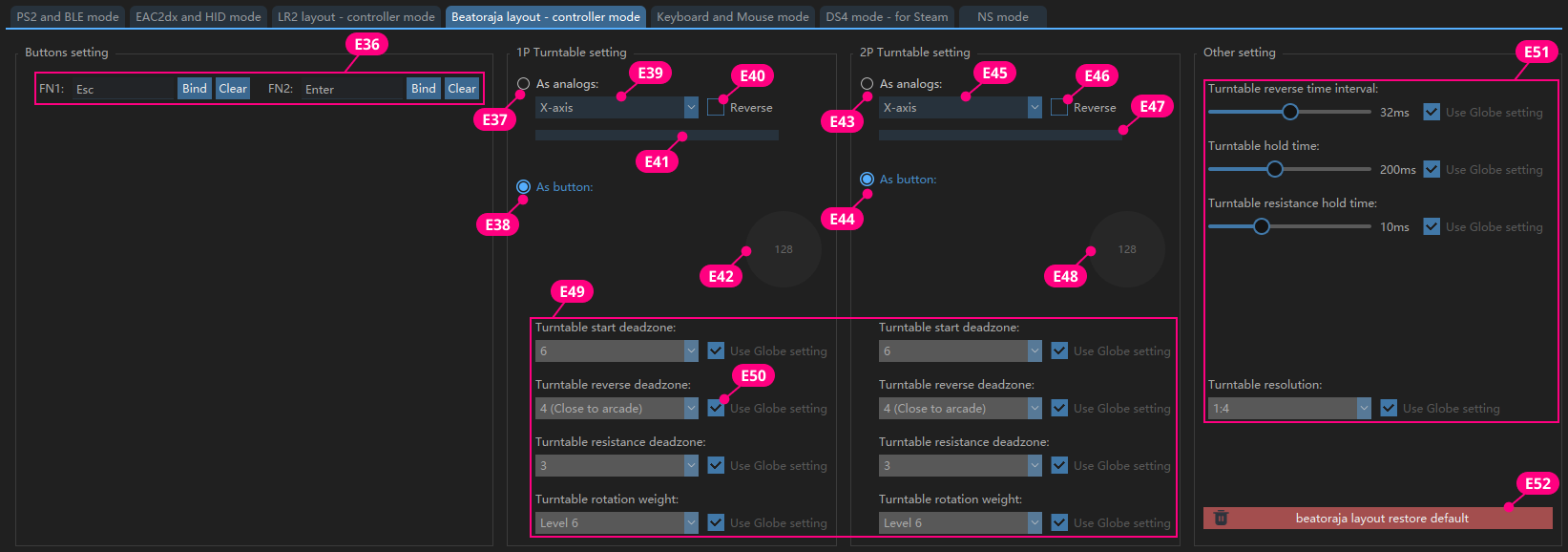
| E36 |
FN1, FN2 can be freely mapped to any keyboard value |
| E37、E43 |
Turntable output as analog |
| E38、E44 |
Turntable output as two different key values |
| E39、E45 |
Select Turntable as X-axis or Y-axis |
| E40、E46 |
The value of Axis is increasing or decreasing |
| E41、E47 |
Display the current X-axis and Y-axis values in real time; |
| E42、E48 |
Simulate the state of turntable output in beatoraja |
| E49 |
Independently set the parameters of 1P and 2P in this mode |
| E50 |
Check to use the global settings; |
| E51 |
Set common parameters for 1P and 2P |
| E52 |
Restore the current mode to default values |
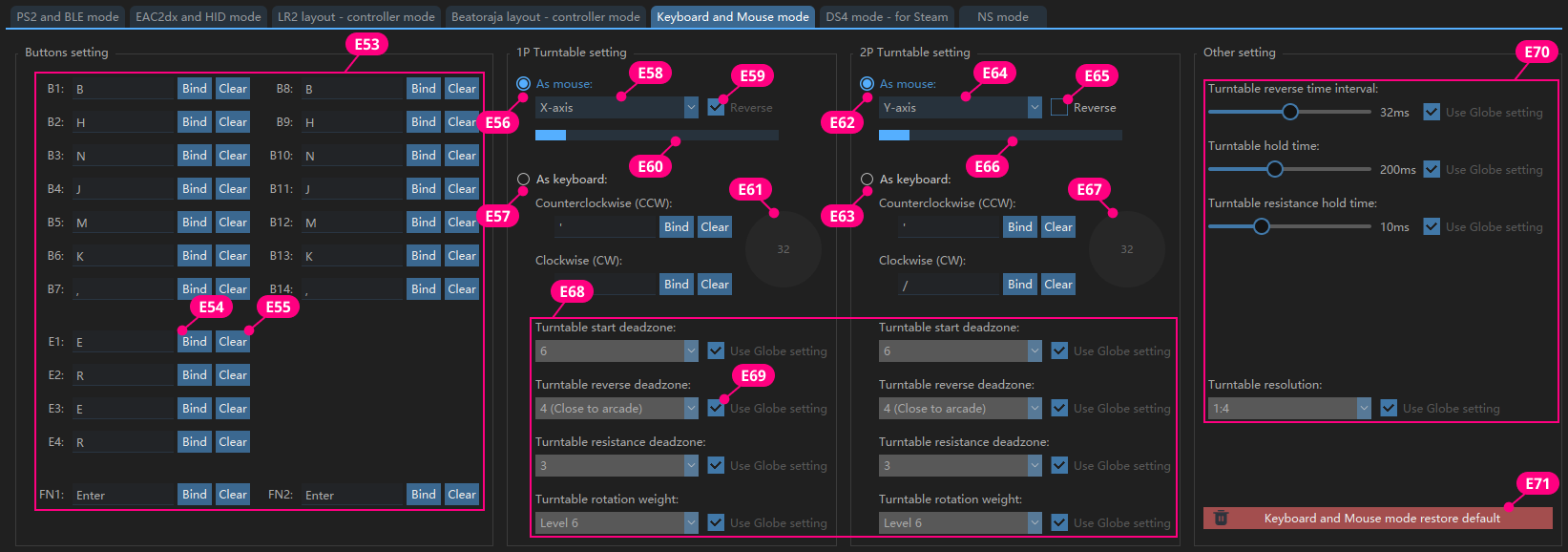
| E53 |
All buttons can be customized. |
| E54 |
Use the mouse to click the button and press the keyboard key to complete the key value customization. |
| E55 |
Clear the currently bound key value. |
| E56、E62 |
Turntable output as mouse. |
| E57、E63 |
Turntable output as keyboard value. |
| E58、E64 |
Select turntable as X-axis or Y-axis. |
| E59、E65 |
The value of Axis is increasing or decreasing |
| E60、E66 |
Preview the increase and decrease of the current Turntable value. |
| E61、E67 |
Simulate the state of turntable output in the game. |
| E68 |
Independently set the parameters of 1P and 2P in this mode. |
| E69 |
Check to use the global settings; |
| E70 |
Set common parameters for 1P and 2P |
| E71 |
Restore the current mode to default values |
The simulated output is a DS4 controller, which can be correctly recognized on Steam in this mode.
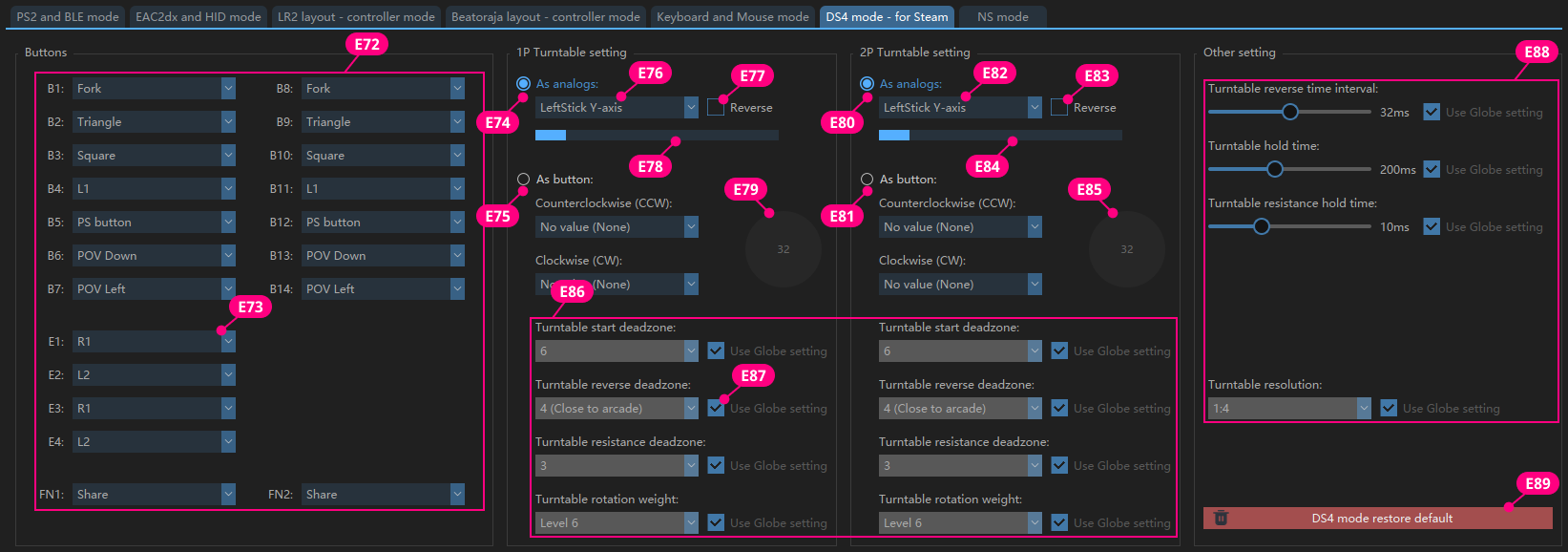
| E72 |
Custom key value, which can be set to any key value in DS4. |
| E73 |
Select the key value from the drop-down menu and it will take effect immediately. |
| E74、E80 |
Turntable output as Axis. |
| E75、E81 |
Turntable output as a key value, which can be mapped to two identical key values or different key values; |
| E76、E82 |
Select the corresponding Axis for Turntable. |
| E77、E83 |
The value of Axis is increasing or decreasing. |
| E78、E84 |
The value of the Axis currently output by Turntable. |
| E79、E85 |
Simulate the state of turntable output in the game. |
| E86 |
Independently set the parameters of 1P and 2P in this mode. |
| E87 |
Check to use the global settings; |
| E88 |
Set common parameters for 1P and 2P. |
| E89 |
Restore the current mode to default values. |
This mode will be added in the future.
The turntable weight(damping) is a global setting. You can enter any value from 0-100 based on your preference.
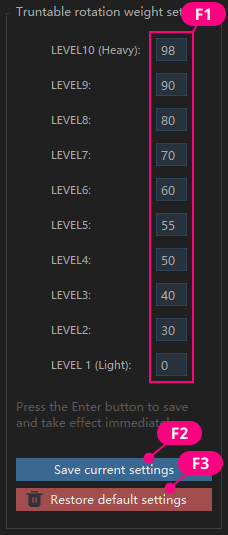
|
F1
|
Damping digital input box, the larger the value, the greater the damping. |
| F2 |
Click the button to save the current value; |
| F3 |
Restore factory default values |



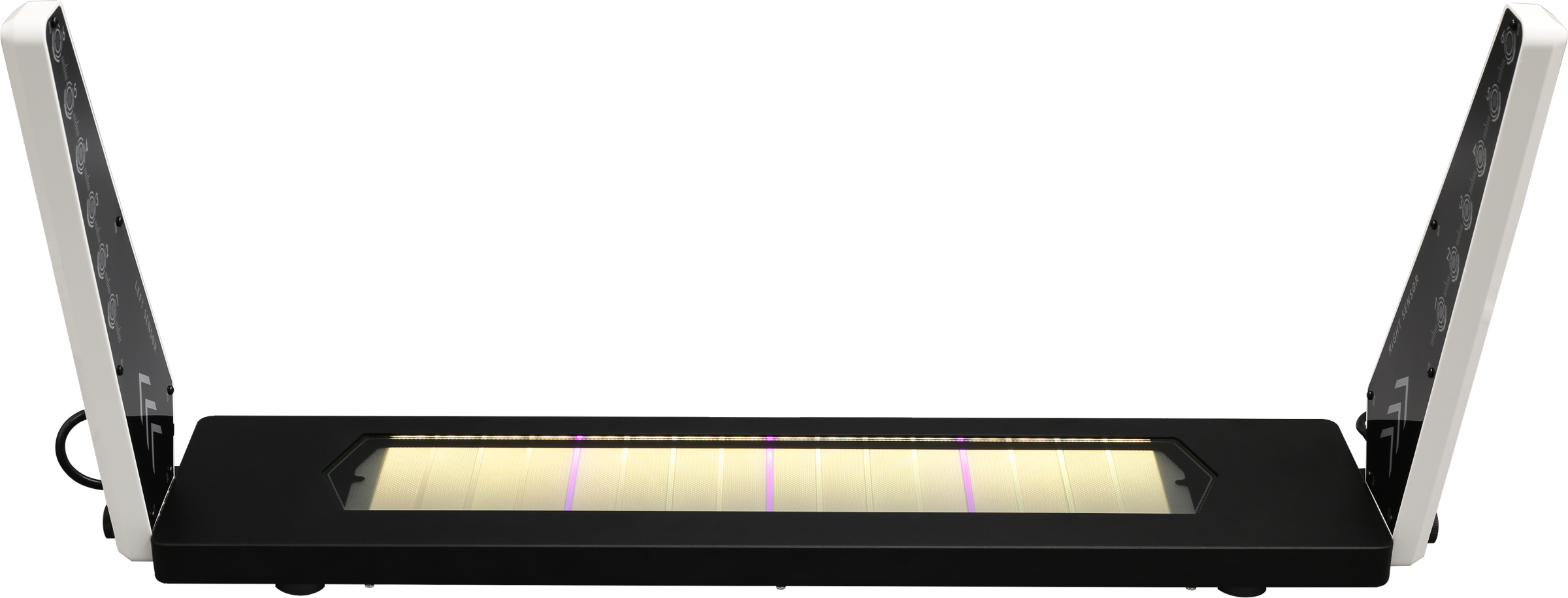

 IIDXOLLER Options V3.2